
On this page, you will find all the information you need for in-person booth logistics and set-up, your virtual booth set-up and management, lead scanning, and your strategic briefing. Please bookmark this page and revisit it as needed leading up to October 1. Remember you also have your unique Sponsor Dashboard (contact Taryn if you are not sure how to access yours) that includes links to your virtual booth and registration form.
Your Strategic Briefing
If you are a Gold sponsor or higher and have not already sent me (Taryn, taryn.johnson@uwebc.wisc.edu) information on your Strategic Briefing, please do so ASAP. We want plenty of time to promote those! This content will be made available on our conference website and promoted via email blasts, our monthly e-newsletter, and our social media channels.
The agenda will be updated with the time slot for your briefings.
Morning slot (9:45-10:10am): SAP, EDCi, enosix, Snowflake, YASH Technologies
Afternoon slot (2:00-2:25pm): WMEP, Enghouse Video, CCMC, Xorbix Technologies, Pandata Group
Room Layout
The Grand Terrace is an open semicircle room with a curved wall of windows facing Lake Monona. Sponsor booths circle the room, while networking tables, food and beverages are set up in the middle. Registration, Track rooms and Strategic Briefings are steps away. When you arrive, someone from our staff will escort you to your booth.
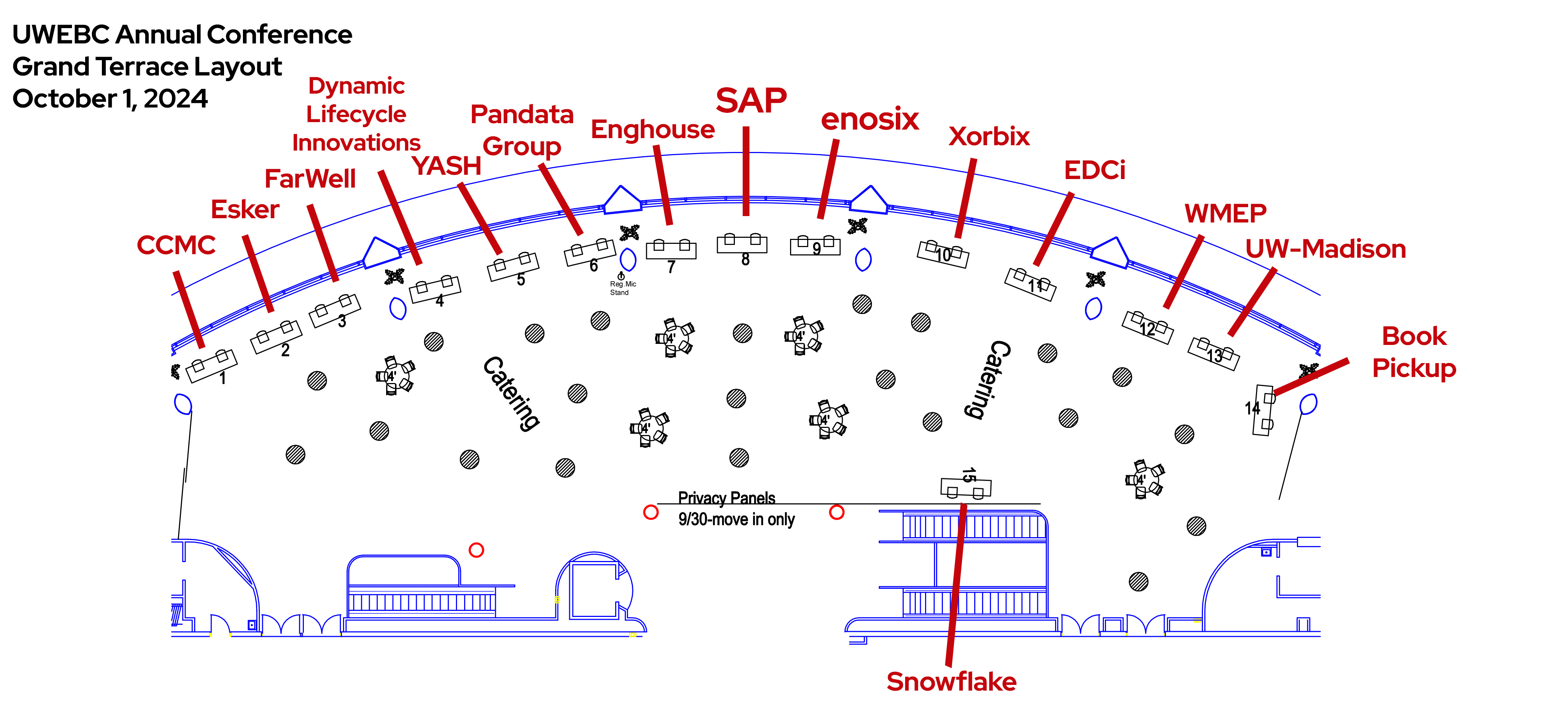
Your Booth
Sponsors have 10’x15’ (Diamond and Platinum) or 10’x10’ (Gold and Silver) spaces with a topped and skirted table, two chairs and power (three outlets). Past sponsors have used pop-up displays, pull-up banner stands, posters on easels and monitors in their exhibits. All tables are 8’ x 30”.
Power: Your three outlets are included in your sponsorship; however, if you do NOT need power, please let Taryn know so we can inform the venue not to run the power to your booth.
Wifi: Wifi is available for free throughout the Monona Terrace and is not password protected. If you have a device that needs a faster connection, we can provide you with a login code for up to two devices per sponsor. Your code will be available at your table when you arrive.
Additional items for your booth: If you need to request additional items from Monona Terrace, such as an LCD screen, a power strip, or catering items, you may do so via their order form. Note: UWEBC is paying for power and high-speed internet for two devices for you, so you do not need to request those items on the form, unless you require additional high-speed or wired internet hookups.
Shipping Items
You may ship event items (print collateral, trade-show setup, etc.) to the venue, within 10 days of the conference. If you do not include your company name and “Attn: Michelle Marx – UWEBC Event” on the outside of your shipment, your materials may not make it to the conference.
Ship to:
Monona Terrace Convention and Community Center
Attn: Michelle Marx – UWEBC Event
[Insert your company name]
One John Nolen Drive
Madison, WI 53703
If you would prefer to walk in your materials, you can park at Monona Terrace, and there will be a loading area on Level 4 (the same level as the Grand Terrace). Parking details will be sent about a week before the event.
After the event, you may pack up and label any items you need shipped back to you and we will take care of getting them down to the loading dock for you. Please bring your own shipping labels.
Set-Up
Sponsor set-up begins the day before the conference. You can move into the Monona Terrace:
2:00-5:00pm on Monday, September 30 (day before the conference)
6:00-7:00am on Tuesday, October 1 (morning of the conference)
Networking during registration is one of the busiest times for the sponsor area, so please be completely set up by 7:00am.
Tear Down
Immediately following the conference (5:30-6:00pm), we will be holding a “Gallery Walk” where we are inviting our attendees to view the artwork that has been created throughout the day by graphic artist Lin Wilson, interact with the artist, and take pictures with Bucky. This will take place next to the sponsor area, so if you want to keep your booth up for additional networking and mingling, you are welcome to. If you do not wish to participate in this event, please tear your booth down while sessions are happening, between 2-5pm. Otherwise, you’ll be able to tear down the booth after the Gallery Walk, between 6-8pm.
Lead Scanning
Lead scanning is available via an app you can download on your phone for free. No need to rent lead scanners or spend any money – just download the app and scan the QR code that attendees will have on their name badge! Here are instructions on how this works. You will receive your login information once you are 1) registered for the conference and 2) our virtual portal is set up.
Please share with the login information and instructions with anyone on your team that will be staffing the in-person booth. Note: Any visitors to your virtual booth are automatically captured for you; no need to scan anything or ask people for their info. This will be accessible in real-time and also available after the fact.
Virtual Booth
Upload any materials you’d like to make available in your virtual booth using the link on your Sponsor Dashboard prior to the day of the conference.
If you are planning on having staff actively monitoring the booth during the conference, please have them watch the video below and/or set up a time to meet with me (https://calendly.com/taryn-johnson) to go over how to use and make the most of the virtual portal. The closer we are to conference day, the better, so that the information is fresh in their minds! 10-15 minutes is plenty of time to go over this.
During the lunch hour and any networking times on the agenda, you are welcome (encouraged, even!) to draw virtual attendees to your virtual booth using the built-in Live Presentation feature. Again, watch the video or set up a time with me to go over how to use this feature.
Note: The video is from a previous year’s setup. This year will look slightly different but the functionality is the same.
Registrations
If you haven’t already, please register your staff who will be managing your in-person and virtual booths, as well as your strategic briefing speaker(s). You can do this via the My Booth tab in your sponsor portal (linked from your Sponsor Dashboard google doc). If you need assistance, don’t hesitate to reach out to me!
Beyond your complimentary registrations, you have an unlimited amount of registrations at 50% off that you can use however you’d like. Let your colleagues know, as well as any clients or prospects you’d like to see at the conference! All sponsors have the same code for this – SPONSOR – which is entered at checkout for the discount. If you want your own code created for marketing and data tracking purposes, just let me know and I can create a unique code for you.